
|
|
Garmin offers a software package called "Training Center" that allows you to view recorded GPS routes. Even if you don't own a Garmin device, you can download Training Center and use it to analyze any route saved on veloroutes.org exported in the TCX format.
Any saved route on veloroutes.org can be exported to the TCX format used by Garmin devices and software. This means you can click out a route and have a Garmin device help you navigate it. Training Center also allows you to click on any point in the elevation graph and see exactly where that point is on the map, which is a great feature.
To load a route into Training Center, first download it to your computer by pressing the "Garmin" button on the routes page. Then launch the Training Center app, and go to File->Import->Courses... and select your file.
Here's a screenshot of the Training Center app:
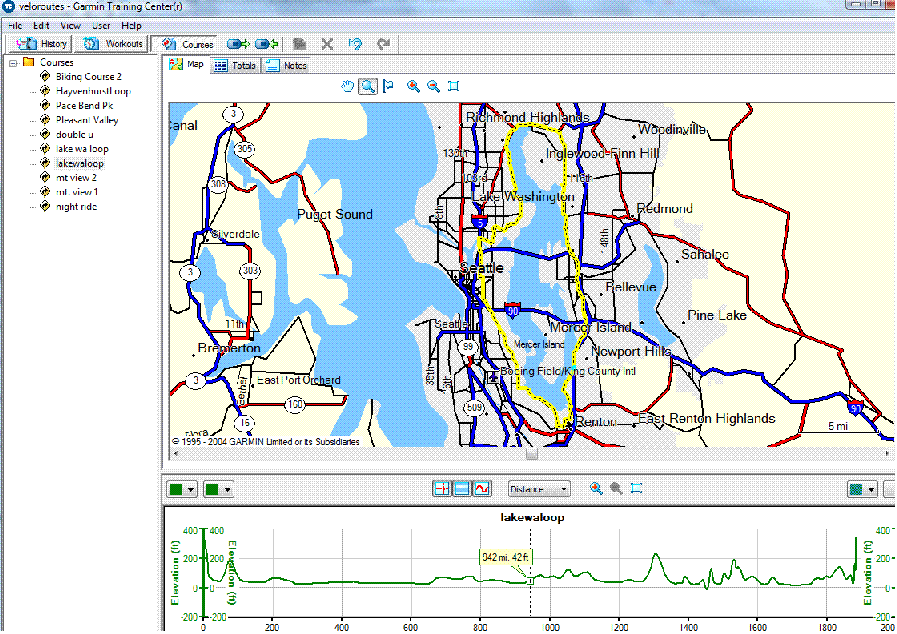
Tested on Windows Vista using Garmin Training Center version 3.3.2.
Garmin Training Center © Garmin Ltd.